|
Now that we've
constructed the basic pattern for a full
instrumental Reggae track, it's time to add
some more flavor. In principal, though,
musically spoken our riddim is fit to serve
as a backing track for a (good) singer or MC
at a Sound System set. However, lots more
has to be done in the audio field but that's
for a later stage in this tutorial. At this
moment, we need to go a little bit deeper in
creating an instrumental Reggae track and
it's time to pay some attention to the
theme.
Next to the
Drum and the Bass, many people are outspoken
when it comes to the theme. A lot of people
want themes to be played by real horns and
nothing else is good enough. Themes,
however, can be played by many more
instruments, including synthesizers and
other keyboards. So before we
continue, let's
first recall what exactly a
"theme" means, in the context of
this tutorial. In
chapter twelve, we've proposed the following
definition:
Usually,
a riddim is recognized by it's bassline.
But there is also another section of the
band that places it's mark on a riddim and
that is the "theme section". In
the 1970's, the horns took a predominant
place in Reggae Music. Partly, they could
be seen as a factor in the Riddim Section.
But horns can also play themes: short
harmonic melodies. Themes can also be
played by keyboards or other instruments.
(source)
When the
previous chapter needed a disclaimer because
of chordical shortcomings, this applies
even more to the contents of this chapter.
That means, that you will get a basic idea
and principal but it will not take you very
long to go much further than this chapter
can lead you. When you have a basic
knowledge of chords and chord progressions,
you can make more complex themes than I can
dream of.
That said,
let me take as the standard for this part of
the tutorial the music I've created during a
good part of this century until recently
when I stepped into the realm of real horns
and with that, audio. The electronic horns I
used before that sounded way more cheapo
keyboard than if I would have used a de
facto cheapo keyboard but for many reasons I
sticked to using a sampled brass section.
That virtual brass section contained three
samplers: one carrying a trombone, one
having a saxophone while the third had
trumpet sounds loaded. The melodies I did
with MIDI and all I can do is sharing the
principals I kind of discovered for myself.
I am, again, aware that I know very very
little about chords and thing, but on the
other hand I'm sure I can help out at least
a few people.
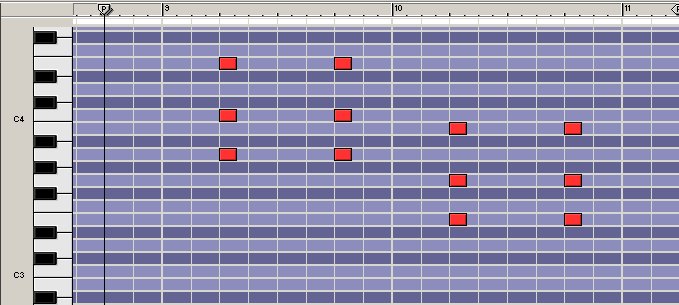
Let's first take a look again at the two
chords of our riddim:
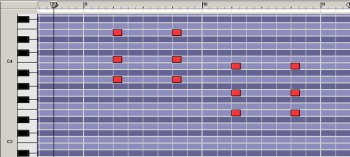
These two chords form the guideline to
safely constructing a theme without having
too much musicological knowledge. The reason
for that is quite simple: together, the
three brass instruments will play a chord,
just like the piano and the organ. Although
these chords do not and will not be the same
while the theme is played, it's -just like
when you construct a bassline- safe to let
them play the exact same chords on the 2nd
and 4th count as the skanks.
Since there are three instruments, there
will be one that follows the chord
progression. In a way, again, just like when
you construct a bassline with two chords as
a guide. The other two instruments will play
the same melody but a couple of tones higher
(or lower). This is a process for which you
will need your ears as much as your eyes,
especially when you are -like yours truly-
completely unaware and ignorant of tone
scales. So it has to sound right, and to
find the right tone can be quite a
quest.
Now, let's hook up three more samplers to
our configuration and load them with a
trombone, a saxophone and a trumpet
instrument. For this tutorial I use standard
sounds from Reason 3.0's Factory Sound Bank
(sax) and the Orkester Sound Bank (trombone
and trumpet), by the way.
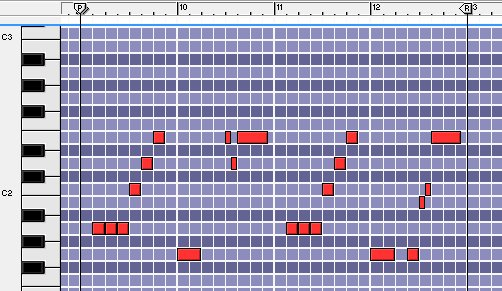
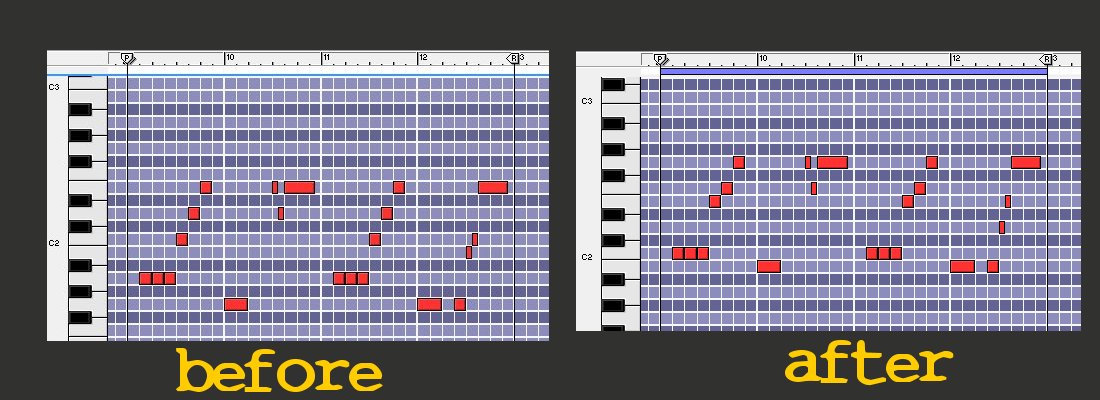
Go to the 9th bar in your sequencer, and
open the Piano Roll for your trombone. Make
a 4-bar loop from the 9th to the 12th bar so
that it continually plays. That's where
we're going to create a simple theme to
establish some principals you can use in
your creative explosions. Make the following
theme for your Trombone, using 8th's and
16th's (Click to enlarge):
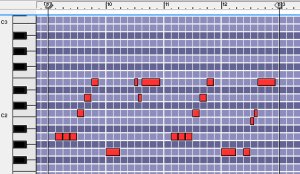
EXAMPLE0033.MP3
As you see, the theme is created on the
same basis as the bass line. Using tones
that are present in the chord on the 2nd and
the 4th count. However, we have to create a
harmonic structure so that the sax and the
trumpet can play along as well without
playing the same thing the trombone does.
The three instruments will continually
produce a chord, in fact there will be
several chords in the whole theme.
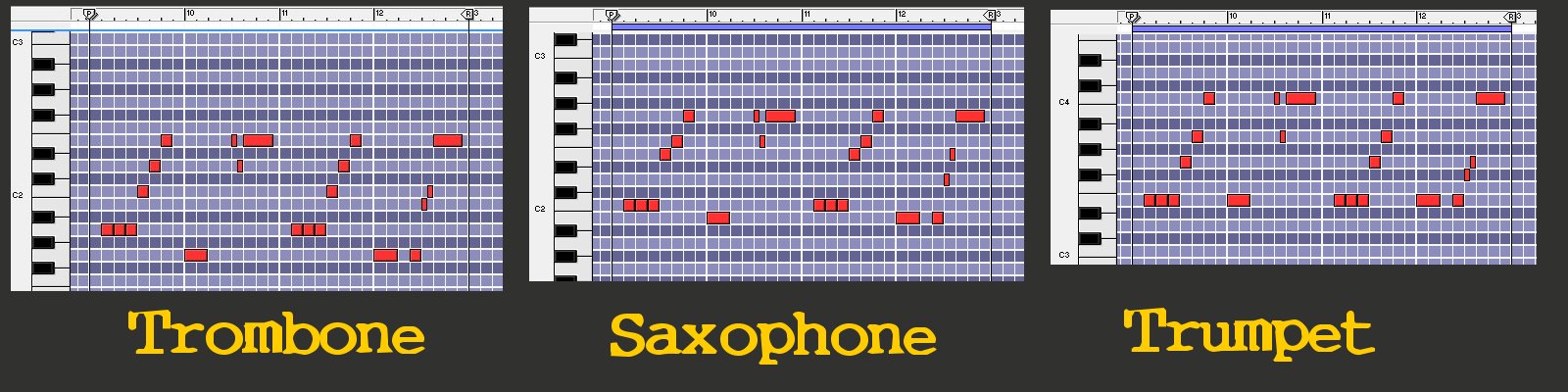
First things first, though. Over to the
saxophone. Copy the midi notes from the
trombone to the piano roll of the sax. They
should now be playing the same notes. What
we're going to do is this: we're going to
transpose the notes of the saxophone 3 to 4
tones, while the idea of the theme is
followed. Make the following transition in
your saxophone roll (Click to enlarge):
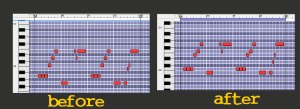
EXAMPLE0034.MP3
Now copy the saxophone part
to the trumpet and, yes, you guessed it,
transpose once more. First, for this
tutorial transpose the trumpet a full octave
and then transpose according to the next
graphic (click to enlarge):
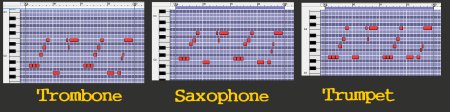
EXAMPLE0035.MP3
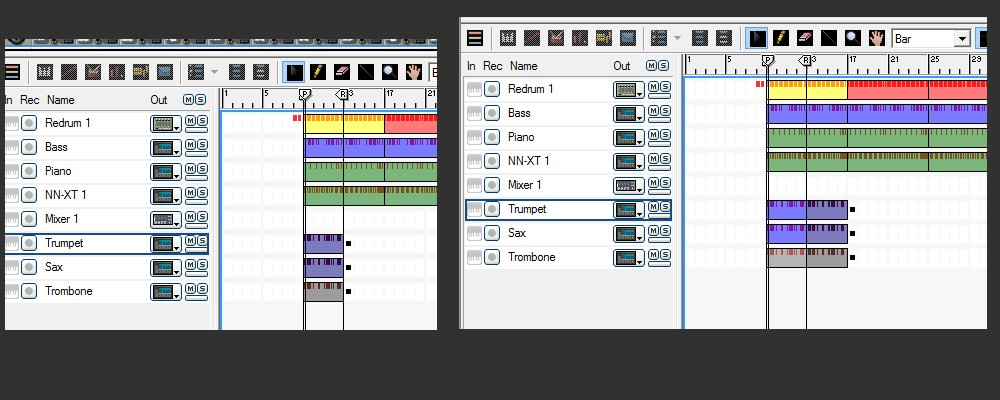
Now copy and paste the full
four bars of the three instruments like the
example below (click to enlarge):
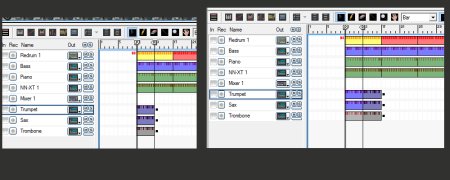
EXAMPLE0036.MP3
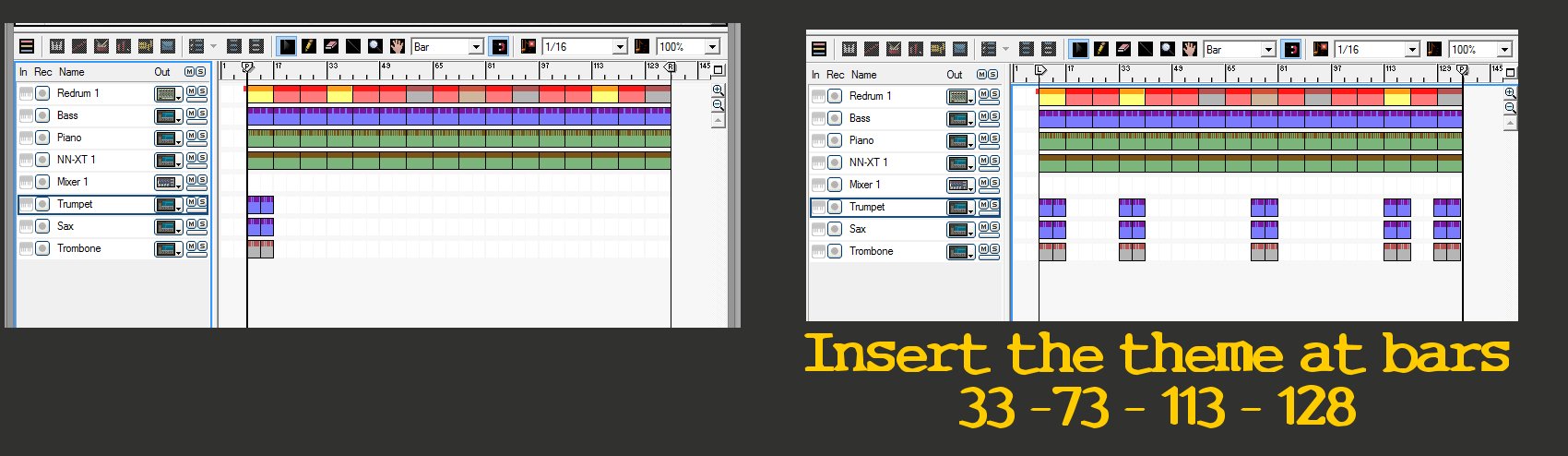
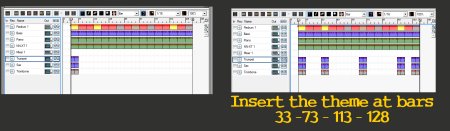
Let's keep it simple and
just past the theme in every place where a
drum roll is, so that the theme will end
with a drum roll. Check this (click to
enlarge):
Sure, this is not a theme that will touch
the hearts and souls with majestic vibes et
cetera. For this tutorial, though, it's a
good one as it establishes a few guidelines.
You will probably have noticed that
there's a D-chord and a B-chord played by
the horn section, the trumpet keeps playing
the E-tone in both bars as the section plays
the dominant chord, these are things that
have to do with musicology and a little bit
of study will reveal a lot.
In the silent parts, you can make the
horns play along with the riddim, add little
hooks here and there, the possibilities are
endless but they do depend on your ear and
creativity. That's not a thing any software
will do for you.
|