|
Now that we've created the full drums for
our first Midi riddim, it's time to put a
little more attention to the riddim
section.
Before we dive into the topic though, a
little disclaimer.
Yours truly has many weak points and this
is absolutely one of them. You will
definitely benefit from studying a little
musicology when it comes to chords and chord
progressions, and it will not take you too
long before you are smiling about this
little chapter.
Anyway, let me bend down low and tell you
what I know, to paraphrase a little lyrical
expression by a certain brother.
The riddim or "skank" follows
or emphasizes the bass line by hitting a
chord on every 2nd and 4th count of a
bar/measure. There are extra chord hits,
like in the Piano we programmed a couple of
chapters ago. However, just putting a Chord
hit on the 2nd and 4th count in itself will
already provide you with a most basic riddim
or "skank".
A standard Reggae riddim section contains
a Piano, a Guitar and an Organ. Mind you,
this is a standard set-up and there are more
variations possible than we can think of
together. Creativity and vibal preferences
should be the main drive! For this midi riddim we will use
this standard set-up, though. This track is
about principals and so on, not about
creativity.
We already have the Piano in our
instrumental track. We've made an 8-bar loop
and it's fine like that. After all, we are
creating this riddim to make a Dub and most
of the times the skanks will not be there in
the mix.
Let's hit the Organ next. For this
example I will simply use a standard Organ
out of Reason 3.0. As we're going to make a
classic Reggae Organ "bubble",
picking a Hammond or Hammond style organ
will do it. So go to your sequencer, open a
Midi channel and assign it to an organ or
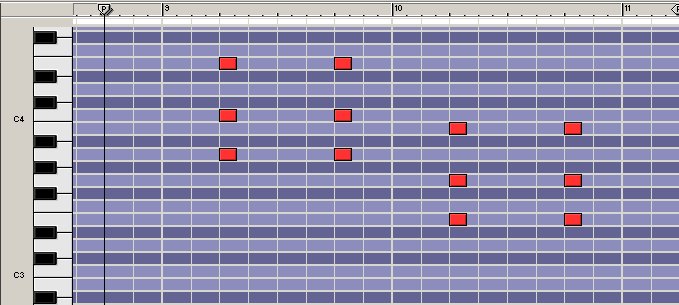
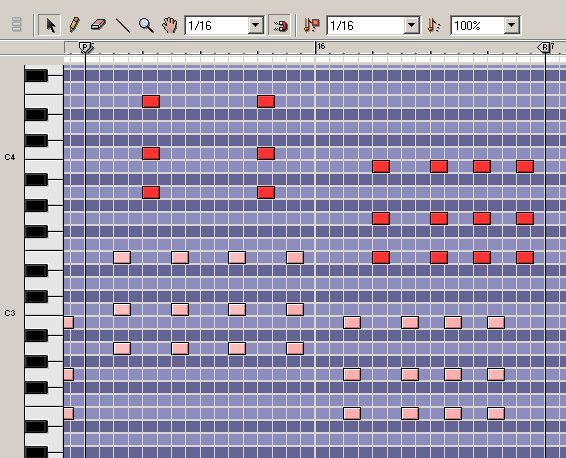
sampler. Go to the 9th bar and simply put in
the following chords on the 2nd and 4th
counts (click to enlarge):
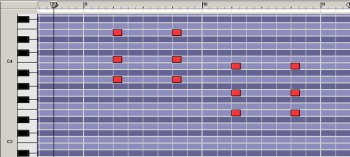
It's important that you put in the chords
with the "A" below in the first
bar and the "E" in the second. Now
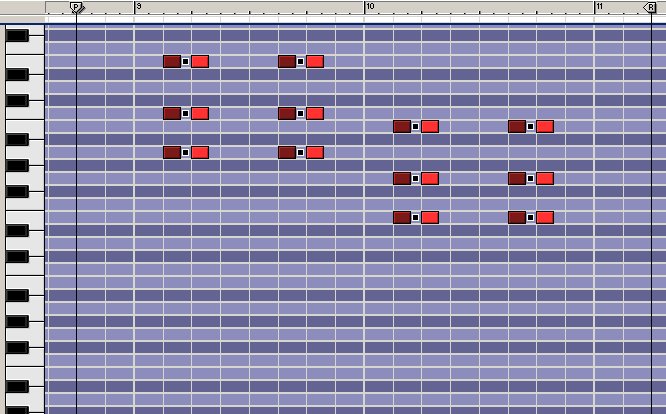
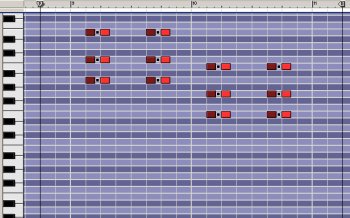
you have a standard skank but to make the
classic "bubble" you need to put
in extra hits. You can simply copy the hits
and paste them 1/8th before the 2nd and
fourth count. See below (click to enlarge):
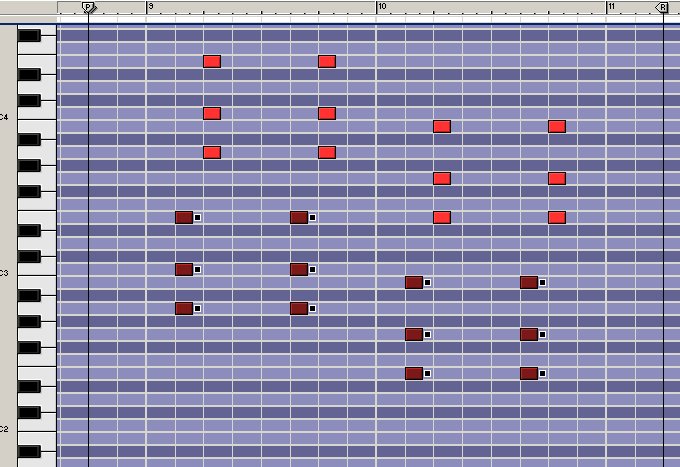
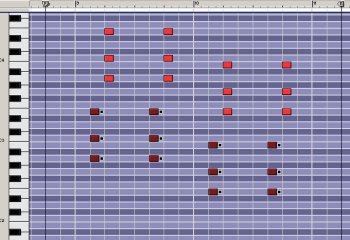
Now, transpose the chord hits you just
pasted one octave below as you can see in
the next graphic (click to enlarge):
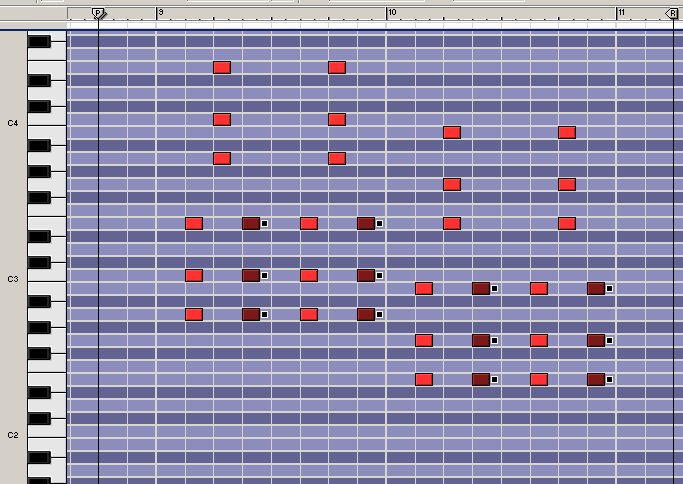
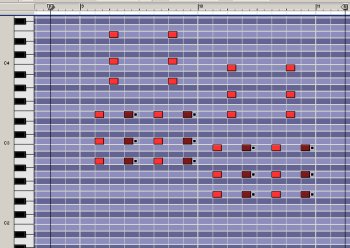
To complete the "bubble", copy
and paste the hits also 1/8th count behind
the hits on the 2 and 4 (click to enlarge):
EXAMPLE0027.MP3
The chords we've just copied and pasted
can be considered as the left hand of the
organ player, where the right hand plays the
chords on the 2nd and 4th counts. If you
want, you can lower the velocity of the left
hand but when you hear the organ and the
piano together you will hear an emphasis on
these counts already:
EXAMPLE0028.MP3
Now, in principal we can just copy and
paste the two bars of organ but a little
variation here and there can be nice. In a
way, you can do the same with any instrument
in the riddim section as what we did with
the drums: a "break" or little
variation here and there.
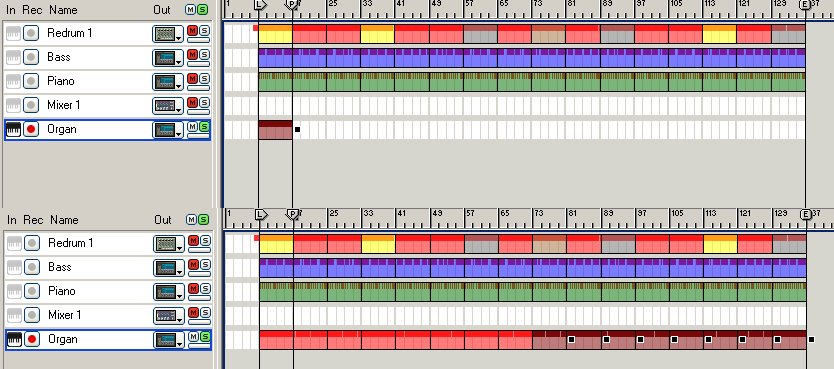
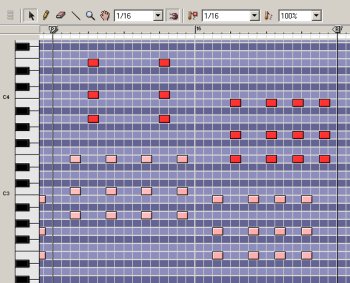
Copy the two bars of argan and paste it
three times so we will have an eight bar
loop. Go to the eight bar, make it possible
to change 16th notes and change the organ
into what you see (and hear) below (click to
enlarge):
EXAMPLE0029.MP3
Copy the eight bars and paste it 15 times
(click to enlarge):
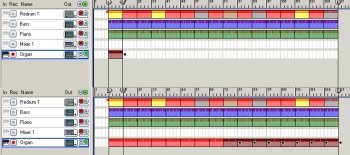
There is our Organ bubble. It should be
self-evident that this is just a classic
Organ line, adding hooks and little melodies
can be added but you'll need some
musicological dimensions which I do not
consider myself to be able to present.
My shortcomings in creating more or less
interesting skanks come to the surface even
more as we approach the final part of this
chapter, which deals with the guitar. For
me, the guitar is where I do no longer use
musical Midi notes.
Personally I use recordings of a real
guitar playing the chord of choice and I
pretty much do not do much more than adding
a hit on the 2nd/4th counts.
Getting a good guitar sound to make a
midi guitar skank is something which I have
not achieved, partly because I kind of never
bothered to find that sound. The obvious
thing is, to "simply" do what I
never did and find that guitar sound, put
the right midi chords in the right place and
copy-paste it.
But since I never bothered to do, let me
make it up to you and share the sounds that
I use, since they are excellent.
So let's just make a short excursion. It
should not be too difficult to use a drum
computer or sampler and insert a few
samples. When you click HERE,
you will be directed to a page from where
you can download the guitar skanks I
use.
Put an "A-minor" chord on the
first bar (2nd/4th counts obviously), and an
"E-minor" chord in the second,
like in the example below (click to
enlarge):

EXAMPLE0030.MP3
Copy and paste so that the whole tune the
guitar will play the right chords in the
right place. Eight bars of your riddim
section should now sound something like in
the next audio example:
EXAMPLE0031.MP3
The whole tune should something like this
(remember you can make free use of the drum
sounds from this tutorial):
EXAMPLE0032.MP3
Needles to say, this concludes a very
primitive explanation of creating a riddim
part in your instrumental Reggae track.
Needles to say, you need to find out things
about chords and which one(s) can be used
for what purpose but all of that goes beyond
my level of expertise.
Still, it's an introduction and the
samples provided in this chapter hopefully
make up a little bit as well. Please do not
link to the samples, especially not the
guitar samples for the simple reason that
you have discovered them by wanting to learn
things rather than looking for cheap ways to
"click-your-own-dub" ;)
|