|
The previous chapter gave us a little
feeling about the Dub we're going to make
later. We've set up a simple but effective
Dub delay and this chapter we will add more
effects. Before we will, though, let me separate
between two kinds of effects and briefly
explain their function in a studio where the
purpose is to make DUB.
Let me exaggerate a little bit, just to
make a point. Let's say that until DUB was
first created (or perhaps even discovered by
accident), effects like delay and reverb had
the function to enhance the sound of
instruments and singers. Still, in much form
of musical recordings this is the way
effects are used. With the introduction of
DUB, the effects became instruments just as
much as the engineer became a musician if
you will.
I know, there's all kinds of
"buts" and thing when it comes to
the actual historical unicity of DUB when it
comes to the transformation of effects from
enhancements to instruments if you will, but
for this tutorial it's more than perfect and
the reason for that is, that you actually
want effects that enhance the instruments
while you want to keep playing with other
effects.
In our case, we will use a reverb which
we'll apply just a little bit on every
channel where we'll use the reverb we
already created as a Dub reverb. We will
also add just one more effect, preferably
some sort of simulation of the Roland Space
Echo. An echo device that in itself lets you
do all kinds of weird things. When you do
not use Reason 3.04 or up, you could use
some kind of VST effect or something like
that. It doesn't really matter, after all it
is your inspiration and choice of effects
that will make your sound. This is merely a
guideline.
We'll put the Space Echo on Aux 3 and the
Reverb we'll use you enhance the sound of
the instruments at aux 4. Make sure (if
possible), you select aux 4 to Pre rather
than Post. When you do so, opening aux 4
will give signal to the Reverb device even
when the channel's volume slider is put all
the way down. When you select
"post", the volume of the aux out
will correspond with the volume on the
channel volume slider.
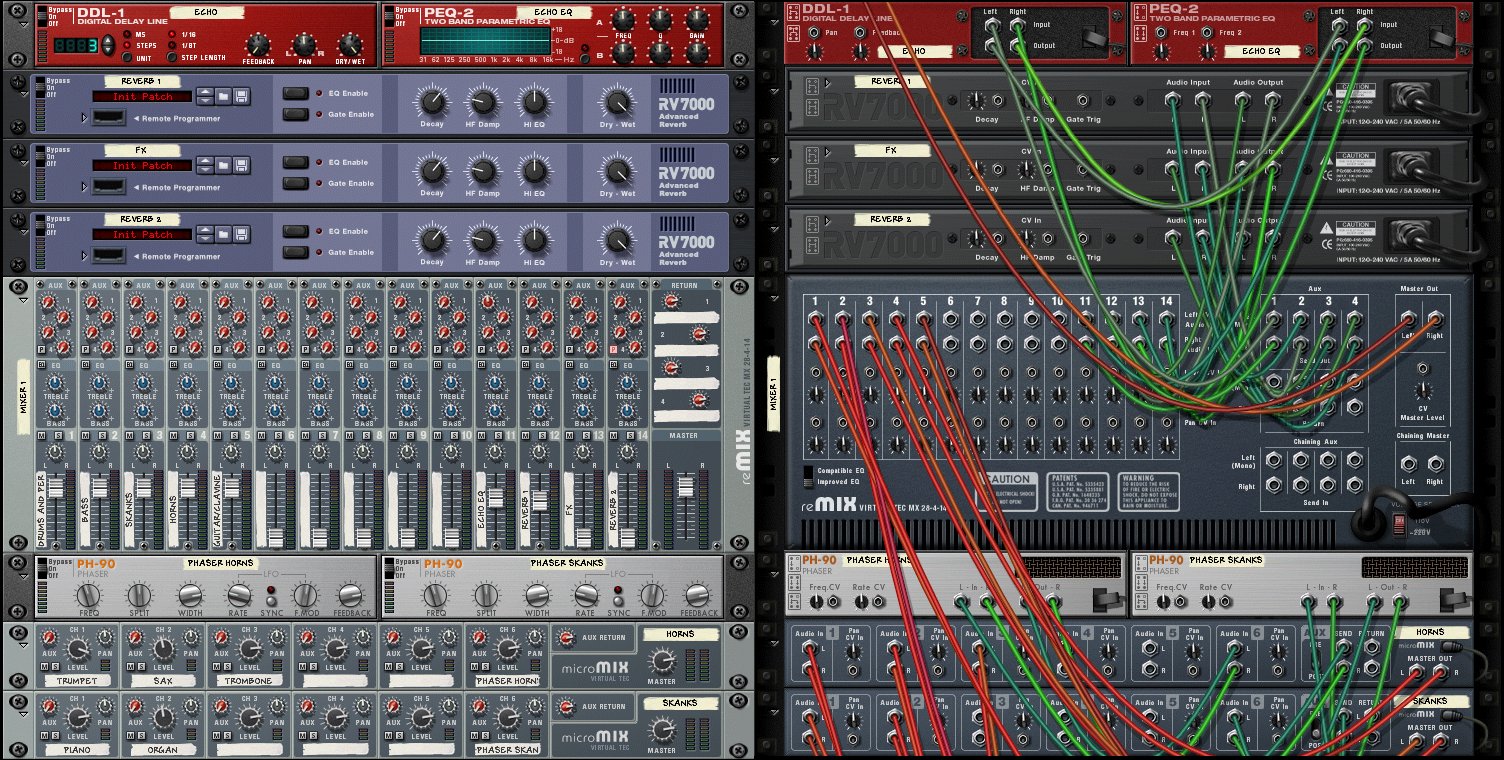
We'll also add two phasers. Or three, if
you like. Since we made sub mixes, it should
be possible to send an aux out from that sub
mix to an effect device and route it back to
the submix. We'll add a phaser to the horns
and the skanks submixes. This will give us a
phased skanks and horns rather than dry
ones. It's just a little bit nice. Of
course, you could add another effect like a
filter or flanger, chorus, what have
you.
Take a look
at the following video, where you can see
everything in action. It sounds more
complicated than it actually is, once you
discover the logicalities behind everything.
Remember, what we're doing is making it as
easy as possible for ourselves so that when
we're Dubbing we don't have to worry about
anything else.
Take a
look at the following screenshots (click
to enlarge):
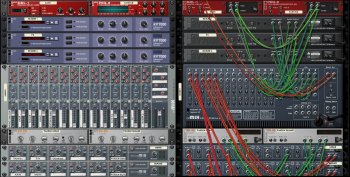
Our
complete set up looks like this in a
table:
| INSTRUMENT |
SUB
MIX |
SUB
MIX FX |
CHANNEL
IN |
AUX
OUT |
DEVICE
|
| Drums |
Sub
Mix 1 |
|
|
|
|
| Kete |
Sub
Mix 1 |
|
|
|
|
| Percussion
FX |
Sub
Mix 1 |
|
Channel
1 |
|
|
| Bass |
|
|
Channel
2 |
|
|
| Piano |
Sub
Mix 2 |
Phaser
Skanks |
|
|
|
| Organ |
Sub
Mix 2 |
Phaser
Skanks |
Channel
3 |
|
|
| Trumpet |
Sub
Mix 3 |
Phaser
Horns |
|
|
|
| Saxophone |
Sub
Mix 3 |
Phaser
Horns |
|
|
|
| Trombone |
Sub
Mix 3 |
Phaser
Horns |
Channel
4 |
|
|
| Pucking
Guitar |
Sub
Mix 4 |
|
|
|
|
| Clavinet |
Sub
Mix 4 |
|
Channel
5 |
|
|
| Delay |
|
|
Channel
11 |
|
|
| Reverb
1 |
|
|
Channel
12 |
|
|
| Space
Echo |
|
|
Channel
13 |
|
|
| Reverb
2 |
|
|
Channel
14 |
|
|
| |
|
|
|
1
(post) |
Delay |
| |
|
|
|
2
(post) |
Reverb
1 |
| |
|
|
|
3
(post) |
Space
Echo |
| |
|
|
|
4
(pre) |
Reverb
2 |
There's
just one more step to take before we can
finally do what the title of this tutorial
claims: make DUB with a computer.
|